
Facebook post likes: a practical guide
To increase likes for a post, you need to choose the right post link, type of interaction and amount. This guide helps you to use the service Increase likes on Facebook on AZLIKE, from the steps of entering a link to checking costs and tracking orders.
Read the full guide
What are Facebook post likes?
Like a post is a service that adds likes or emotions to a specific content on Facebook, depending on the capabilities of the selected server. Terms such as "buff like Facebook" or "buy post likes" often refer to this need. The subject of the interaction is the post, not the entire account.
- Post likes: use the link of the post or content supported by the server.
- Profile followers: use service Increase your personal Facebook followers when you want followers for your profile.
- Like or follow Fanpage: select Like and Follow Fanpage service to work with Trang.
Likes are a measure of interaction. High likes do not guarantee additional sales, organic traffic or suitable customers. Clear content, good visuals and viewer feedback still need to be taken care of.
How to see Facebook like rate on AZLIKE
The current price is listed next to each server in the form above. When selecting a server and entering a valid quantity, please check the entry Cost before you submit your application. This is the price to be referred to at the time of the operation; do not use the price in the instructional image to charge for the new order.
To choose the right service, check four points:
- Status: select a running server; the OFF or disabled server is not used to create orders.
- Type of interaction: Likes, specific emotions or combinations of emotions must fit the need.
- Condition: read description, type of supported link, quantity limit and additional fields that appear after selection.
- Cost and policy: compare the price with the terms of handling, warranty or refund published for that server.
Do not assume that all servers have the same speed, interaction sources, or refill policy. If you change servers, you need to re-examine the emotions, quantities and total costs.
How to increase likes of Facebook posts on AZLIKE
Step 1: Prepare and paste the post link
Open a Facebook post that needs to be interacted with, use the copy link function of the post and go back to the section Post likes on AZLIKE. Paste the link into the link field using Paste or your usual paste command. You can open How to find the link directly below the field.
Checks that the link opened correctly and that the post meets the access rights requested by the server. Do not use personal page links instead of post links. If multiple links are selected, enter each link on a line and check each object before confirming.
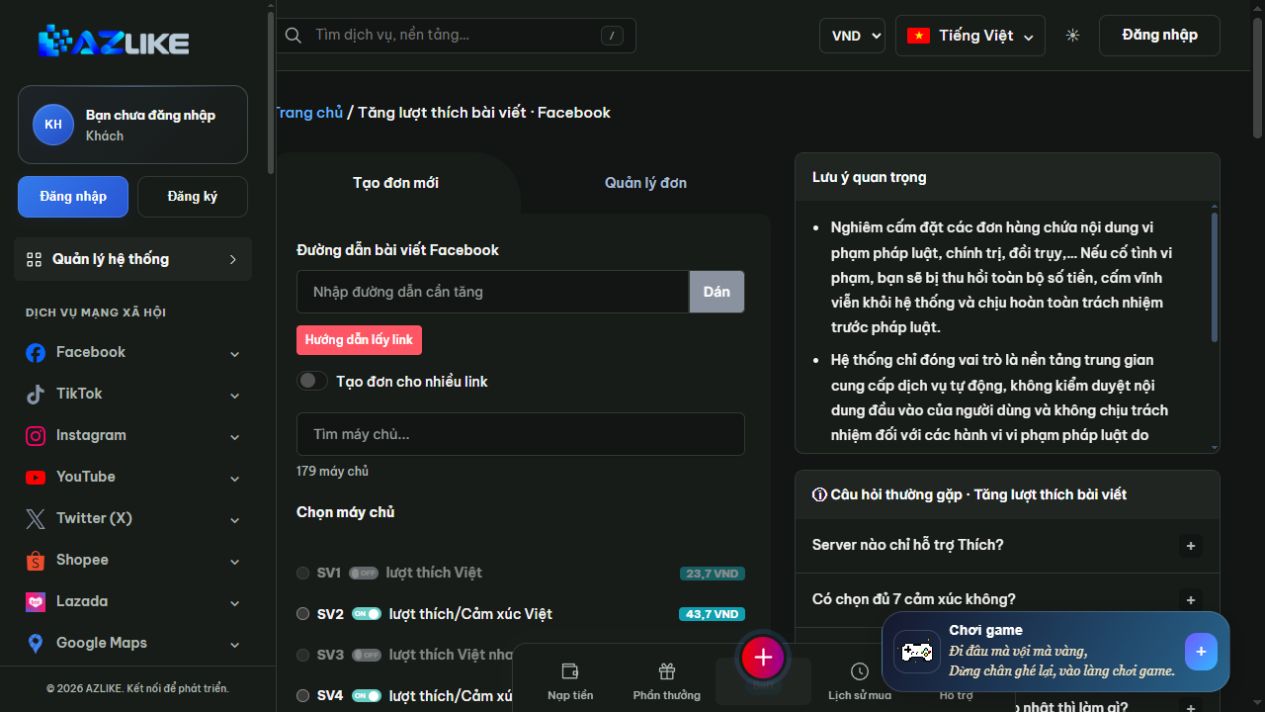
Step 2: Choose a server and reaction type
Use the search field: Find a server or scroll through the list to see the options. Select the round button next to the appropriate server, then read the information and display options. Only select the emoticons that the server is supporting; do not assume that all choices have enough of every emotions.
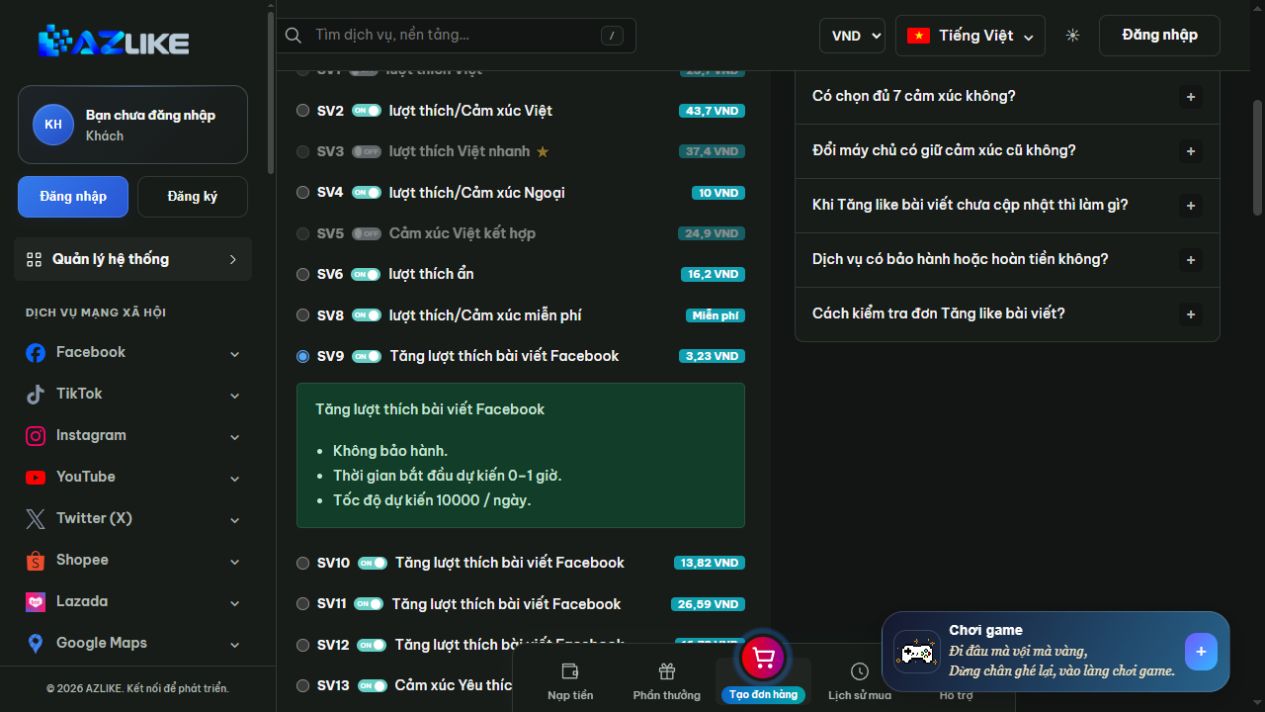
Step 3: Enter quantity and check cost
Enter the number within the limit notified to the selected server. Fill in additional fields if necessary and add notes if needed. With multi-link mode, check the quantity and total cost labels to avoid mistaken quantity of each link with the entire request.
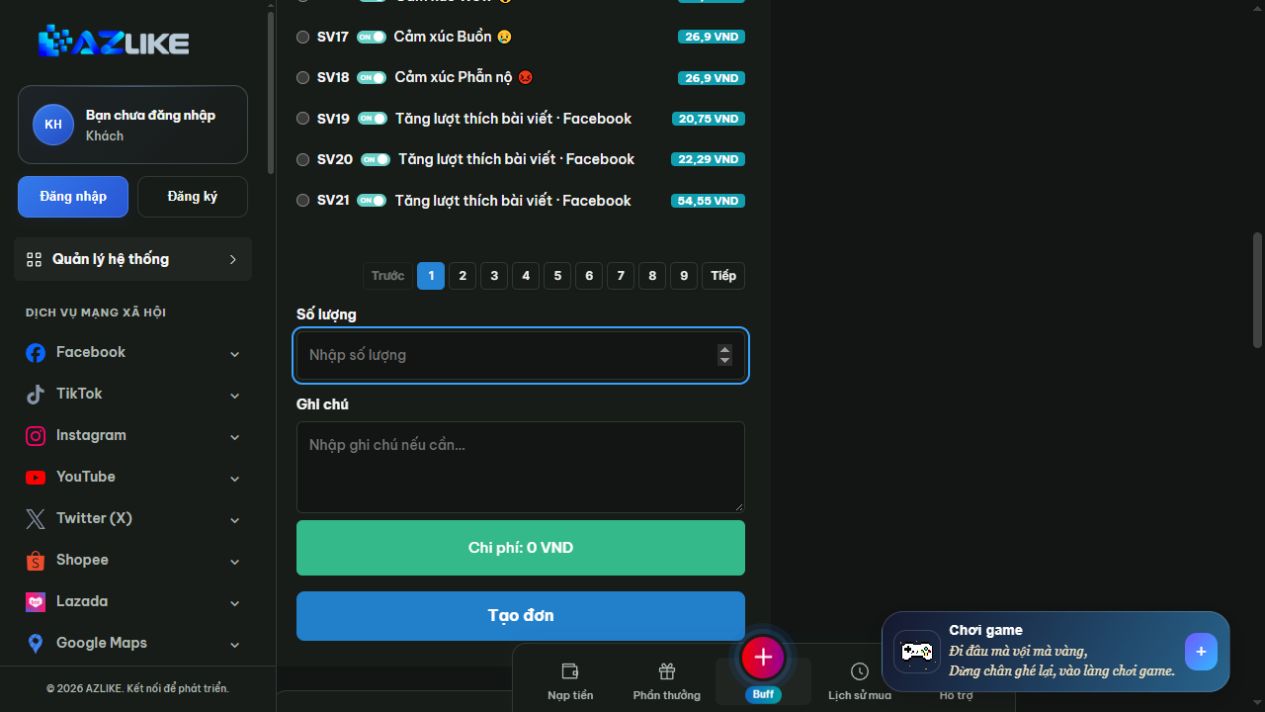
Step 4: Login, check and create order
Log in to your AZLIKE account to create and manage orders. Before Pressing Place order, check the link, server, type of emotions, quantity, note the service and cost. Read the system's confirmation message; only view orders received when there is a result and the corresponding order number.
Don't enter your Facebook password in the link box or note. Logging into AZLIKE and logging into social networks are two different things.
Tracking orders , liking and handling when not updated
Open Tab Manage orders of the service to compare order numbers, routes and status. If the number of likes on Facebook has not changed, first check that the request has been received, that the article is still accessible and that the server has notified you of any processing conditions.
Don't resend the same request just because you clicked and didn't see the data increase. If the submission result is unclear, check the history first. If you need help, send the order number and a description of the problem via Support or AZLIKE link page; no password sent.
Frequently Asked Questions About Post Likes
Can I choose likes or a specific reaction?
Depending on the server. Please select the correct type of service and check the actual options that appear in the form. When switching servers, re-reflect the emoticon selection before sending.
Are there any free post-like servers?
If the list shows that the server is "Free" and running, read the terms and conditions of that option. The availability depends on the current state; the guidelines do not commit to a fixed free limit.
How long does an order take, and is a refill guarantee included?
The timing and policy depends on each server and the status of the request. See description, notices in forms, and the form management section; do not apply a time limit or general policy for all options.
Do post likes also increase Facebook followers?
You shouldn't think of two metrics as one. If the target is an account follower, choose the personal follow service. If the target is a Page, select the corresponding Fanpage service.
Do I also need comments, shares, or views?
Only select by the specific purpose of the content. You can see Increase Facebook comments, increase article sharing or Increase Facebook views to distinguish between objects and conditions; these indicators do not themselves accompany the singular like.
Conclusion
Choosing the right service, the right article and the appropriate budget is the first step to use it Facebook like service It's working. On AZLIKE, you can see which servers are operating, check costs before creating orders and track the processing progress right in your account.
Whether you're building your personal brand, taking care of the content for your store or managing your business Fanpage, combine interaction with helpful posts and thoughtful customer feedback. Access Facebook like service at AZLIKE, choose the appropriate server and start with your actual needs.