
YouTube comment replies: a practical guide
YouTube comment replies — A useful series of answers begins with a careful reading of Father's comments. The content of the response should explain or supplement information, not copy general sentences.

Read the full guide
Choose a service that fits your needs
YouTube comment replies must match the intended target: He commented on a YouTube video. Reply is not an independent new comment. Do not choose a server just because its name looks similar. Read the selected option's description and check the target content.
On AZLIKE, the search box narrows down the server list. The information shown for each server helps you compare the available options. Prices and limits depend on the server you select; use the current form settings as your reference, rather than relying on a screenshot alone.
Apply this to your content
If a viewer asks about the tool in the video, a short answer with the relevant item name is easier to use than pasting the entire description. Keep the content of the response attached to the father's question to avoid losing focus.
How to use AZLIKE
Step 1: Check the link before entering it
Open the correct service: Comment replies in the YouTube section. The form displays the field YouTube link. Copy the link for He commented on a YouTube video, open it to check the destination, then enter it or select Paste. If you are unsure about the format, read How to find the link next to the form.
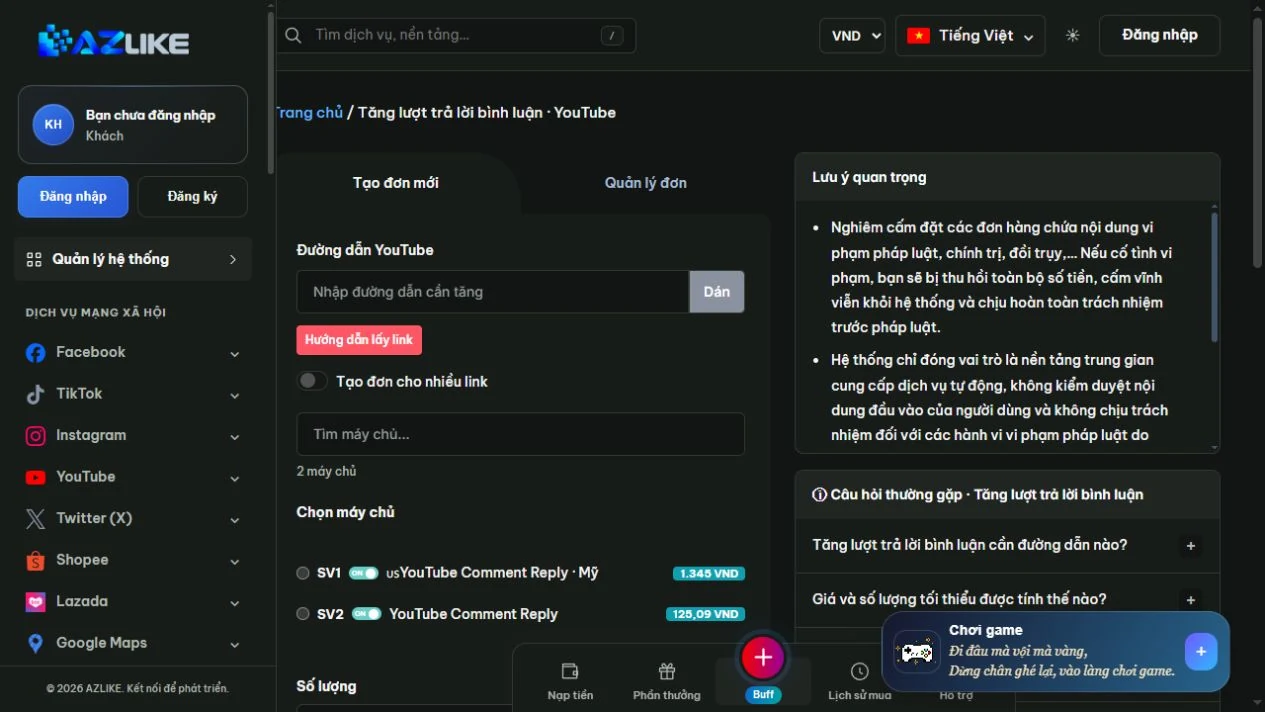
Step 2: Choose a server that matches your requirements
Use the search field: Find a server, read the description, and select the radio button for the appropriate option. Check the target type, quantity limits, and processing conditions. Do not submit an old configuration for a server that is paused or unavailable for orders.
Step 3: Complete the settings and check the cost
Enter the quantity using the unit specified by the selected service. Additional fields depend on the selected option: if the form asks for content, an option, or a duration, complete the fields shown. Do not assume every server requires the same information. Check the total Cost after completing the configuration.
Step 4: Confirm and track your order
Sign in to AZLIKE, review the request details, and confirm. Save the order ID and open Manage orders to check the status for the correct service. If anything is unclear, contact support with your order ID. Do not share your social media password.
A small change worth trying
Practical tip for YouTube comment replies: If the viewer asks how to do it, give a short answer and point to the relevant section of the video.
How to assess your results: Record what you changed, when you changed it, and the metric you want to track. Compare results under similar conditions rather than attributing every change to a single cause. If your goal is sales or community retention, also track feedback and meaningful actions.
Things to check before using the service
- Check the target content: Reopen the link and check that it points to He commented on a YouTube video before confirming.
- Understand what the service covers: Reply is not an independent new comment.
- Keep the content and link unchanged: Avoid deleting the content or changing its link while your request is being processed.
- Do not resubmit an order if its outcome is unclear: Check your order history first. If needed, send the order ID to support so they can check it.
Frequently asked questions
What should I check before choosing YouTube comment replies?
Reply is not an independent new comment. Read the description and identify the correct target before comparing prices.
What do I need besides the link?
Prepare the relevant information for He commented on a YouTube video and review the fields that appear when you select a server. Enter only the information required for that configuration. Do not put passwords in the notes.
Where can I check prices and processing conditions?
Check the server list, descriptions, and the total cost after entering the quantity. Conditions vary between options. If anything is unclear, contact AZLIKE support before confirming.
Reference YouTube 's interaction policy before use. Service metrics do not guarantee recommendations, revenue, or eligibility for monetization.
Explore related services
Conclusion
YouTube comment replies — start by understanding He commented on a YouTube video and your goal. If the viewer asks how to do it, give a short answer and point to the relevant section of the video. Prepare your content and review the configuration carefully so you can monitor results with a clear plan.
Visit YouTube comment replies on AZLIKE, check the current information, and choose an option that fits your needs.